
Document annotation is the process of labeling the structural elements, text regions, key-value pairs, and semantic content within documents invoices, contracts, medical records, tax forms, receipts, and legal filings so that AI models can understand not just what text appears on a page, but how that text is organized, what it means, and how different elements relate to each other.
Document annotation operates at the intersection of computer vision and natural language processing. The model must simultaneously see the layout (headers, paragraphs, tables, figures) and read the content (names, dates, amounts, clauses). This makes it fundamentally different from standard text annotation, which operates on pre-extracted plain text and ignores spatial structure entirely.
OCR annotation labeling data specifically for Optical Character Recognition systems is the foundational layer of this discipline. Modern OCR achieves 98–99% accuracy on printed text and 90–95% on handwritten content, according to Kili Technology’s 2026 guide. But even 99% accuracy means errors on every page of a long document. And OCR only extracts text it does not understand layout, relationships, or meaning. Document data labeling bridges this gap, training AI systems that go beyond character recognition to full document understanding.
The stakes are high. Finance, insurance, healthcare, legal, and logistics industries process billions of documents annually. One insurance company using AI-assisted document data labeling reduced their OCR development timeline from 8 months to 3 months by enabling domain experts to validate training data directly. This guide covers every major document annotation method, from layout segmentation through key-value extraction, with the practical depth that document AI teams need.
How Document Annotation Differs from Standard Text Annotation
Standard text annotation works on pre-extracted text strings plain sequences of characters with no spatial information. You label entities, sentiment, or intent within flat text.
Document annotation works on the document as a visual object. The annotator sees the original page scanned or digital with all its spatial structure intact: columns, headers, tables, logos, handwritten notes, stamps, and signatures. Labels are applied not just to text content but to spatial regions, structural elements, and the relationships between them.
This distinction matters because layout carries meaning. A number in a “Total” row means something different from the same number in a “Subtotal” row. A name next to “Patient:” has a different semantic role than a name next to “Physician:”. Without spatial understanding, downstream AI systems cannot reliably extract structured data from real-world documents.
Document Layout Analysis Annotation: Understanding Page Structure
Document layout analysis annotation labels the structural regions of a document page identifying where headers, paragraphs, tables, figures, captions, footers, page numbers, and sidebars are located. It is the first step in any document understanding pipeline because the model must know what type of content each region contains before it can extract meaning from it.
How it works
Annotators draw bounding boxes or polygons around each structural element on the page and assign a region class: title, section header, paragraph, table, figure, caption, list, footer, page number, watermark, stamp, or logo. For complex documents, document layout analysis annotation also captures reading order the sequence in which text regions should be read, which is non-trivial for multi-column layouts, sidebars, and documents with mixed text and visual elements.
Layout-aware models like LayoutLM and its successors use these annotations to learn spatial relationships between document elements. Google’s Document Intelligence platform and Microsoft’s Azure Document Intelligence both use layout parsing as the foundation of their document processing pipelines, with Google releasing Gemini-powered layout parsers in early 2026.
Use cases
Document layout analysis annotation powers automated document digitization (converting scanned archives to searchable formats), intelligent document processing for enterprise workflows, legal contract analysis (identifying clauses, definitions, and exhibits), scientific paper parsing (extracting sections, references, and figures), and medical record structuring.
Common pitfalls
Overlapping and nested regions challenge annotators. A table cell may contain a paragraph, which contains an entity. Guidelines must define whether to label the outermost container, the innermost element, or both in a hierarchical structure. Inconsistent region boundaries across annotators create noisy training data that degrades layout detection accuracy.
Table Extraction Annotation: Labeling Rows, Columns, and Cells
Table extraction annotation labels the structure and content of tables within documents identifying header rows, data rows, column boundaries, merged cells, and the text within each cell. Tables appear in invoices, financial statements, insurance forms, lab reports, and regulatory filings, making table extraction annotation one of the most commercially valuable document AI tasks.
How it works
Annotators identify table boundaries on the document page, then label internal structure: row boundaries, column boundaries, header cells versus data cells, merged or spanning cells, and the text content within each cell. The output is a structured representation of the table essentially a machine-readable spreadsheet derived from a visual document.
Advanced table extraction annotation also captures cell-level semantic types. In an invoice table, a column might be labeled as “description,” “quantity,” “unit price,” or “total.” This semantic labeling enables downstream AI to not just extract the table but understand what each column means.
Common pitfalls
Borderless tables are the primary challenge. Many real-world documents use tables without visible grid lines the structure is implied by alignment and whitespace alone. Annotators must identify these implicit tables and label their structure despite the absence of visual boundaries.
Merged and irregular cells create complexity. A header spanning three columns, a cell containing a nested sub-table, or a row that wraps across two lines all require annotation rules that most standard schema designs do not initially account for.
Form Field Annotation: Extracting Key-Value Pairs
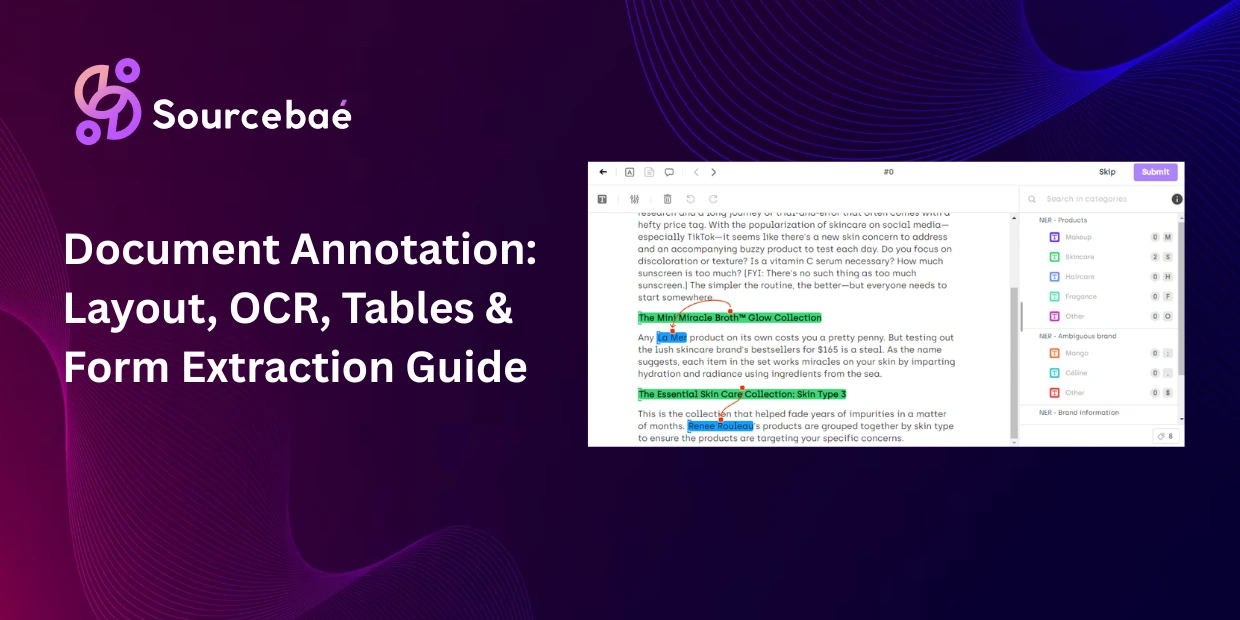
Form field annotation labels the key-value relationships in structured and semi-structured documents identifying field labels (“Patient Name:”, “Date of Birth:”, “Policy Number:”) and their corresponding values, then linking each label to its value. It is the annotation method that directly powers automated form processing, claims intake, and application digitization.
How it works
Annotators identify each field label on the form, mark the corresponding value (whether printed, handwritten, or a checkbox), and create an explicit link between the two. A form field annotation for a tax form might produce pairs like: “Filing Status” → “Married Filing Jointly,” “Total Income” → “$87,432,” and “Signature” → [handwritten region].
Form field annotation is more complex than it appears because real-world forms violate simple left-to-right, top-to-bottom reading order. Labels may appear above, below, beside, or even inside their associated values. Some forms place labels in a different column from their values. Semi-structured documents like business letters may contain key-value information embedded in prose rather than explicit fields.
Use cases
Form field annotation powers insurance claims processing (extracting policyholder data, claim amounts, and incident details), healthcare intake forms (patient demographics, medical history, insurance information), tax document processing (W-2s, 1099s, tax returns), loan and mortgage applications, government benefit forms, and customer onboarding documents.
Common pitfalls
Label-value association errors are the most impactful quality issue in form field annotation. When an annotator links “Date of Birth” to the wrong date field on a crowded form, the model learns incorrect associations that produce extraction errors at scale. Multi-annotator consensus with expert adjudication is essential for high-stakes form processing pipelines.
Dynamic and variable-format forms resist template-based annotation approaches. Every insurance company’s claim form is slightly different. Every hospital’s intake form has unique fields. Models trained on one form layout often fail on another. Form field annotation datasets must include diverse form formats to build models that generalize across layout variations.
Handwriting Recognition Annotation: Training AI to Read Human Writing
Handwriting recognition annotation labels handwritten text cursive, block letters, signatures, and freeform notes with their corresponding transcriptions and spatial boundaries. Despite advances in OCR, handwriting recognition annotation remains one of the most challenging document AI tasks because handwriting varies enormously across individuals, languages, and writing conditions.
How it works
Annotators identify regions containing handwritten text, draw bounding boxes or polygons around them, and provide verbatim transcriptions of the handwritten content. For word-level annotation, each individual word is bounded and transcribed separately. For line-level annotation, entire handwritten lines are treated as single units.
Modern OCR systems achieve 90–95% accuracy on handwritten text significantly lower than the 98–99% achieved on printed text. This accuracy gap makes handwriting recognition annotation data particularly valuable: the model needs high-quality ground truth to learn the enormous variation in human handwriting.
Use cases
Medical prescription digitization, historical document archives, check processing in banking, handwritten form fields in government and insurance documents, postal mail address recognition, and educational assessment grading systems.
Common pitfalls
Illegible handwriting creates genuine annotation disagreements. Two annotators may reasonably transcribe the same scrawled word differently. Guidelines must define confidence thresholds when handwriting is too illegible to transcribe reliably, it should be flagged rather than guessed. Multi-annotator consensus is especially important for handwriting recognition annotation because subjective interpretation is inherent in the task.
Invoice Annotation for AI: Training Financial Document Processing
Invoice annotation for AI labels the specific fields, line items, and financial data within invoices so that automated processing systems can extract vendor names, invoice numbers, dates, line items, quantities, unit prices, tax amounts, and totals without manual data entry.
How it works
Annotators identify and label each meaningful field on the invoice: vendor/supplier name, invoice number, invoice date, due date, purchase order number, line item descriptions, quantities, unit prices, line totals, subtotal, tax, and grand total. For line-item tables, table extraction annotation methods apply labeling row and column structure alongside the content.
Invoice annotation for AI must handle enormous format variation. Every vendor sends invoices in a different layout different field positions, different label conventions, different table structures. A model trained on invoices from 10 vendors may encounter completely unfamiliar layouts from an 11th. Effective training datasets include hundreds of unique invoice formats to build robust extraction models.
Use cases
Accounts payable automation, expense report processing, procurement workflow digitization, financial audit preparation, and ERP system data entry automation. Companies deploying AI-powered invoice processing report reducing manual data entry time by 70–90% while improving extraction accuracy compared to human operators who fatigue over repetitive tasks.
Common pitfalls
Currency and number format variation trips up models and annotators. Is “1.234,56” a European format for 1,234.56, or is it 1.23456? Annotation guidelines must standardize number formats and explicitly document locale conventions. Invoice annotation for AI across international vendors requires annotators familiar with regional formatting standards.
Document Classification and OCR Post-Correction Annotation
Document classification assigns a document type label to an entire page or file “invoice,” “contract,” “medical record,” “tax form,” “correspondence,” or “receipt.” It is the simplest form of document annotation and often serves as the first stage in a document processing pipeline, routing each document to the appropriate extraction model.
OCR post-correction annotation improves the output of automated OCR systems by having human annotators review and correct machine-generated text. Even at 98–99% character accuracy, a 10-page document may contain dozens of OCR errors misrecognized characters, dropped words, merged lines, or broken tables. OCR annotation post-correction provides the clean ground truth that fine-tuned OCR models learn from.
Post-correction workflows typically display the original document image alongside the OCR output, allowing annotators to compare visual text with machine-extracted text and make corrections character by character. This is one of the most scalable forms of document data labeling because the OCR provides a draft that annotators correct rather than creating transcriptions from scratch reducing effort by 50–70%.
Tools and Formats for Document Annotation
Selecting the right platform for document annotation requires evaluating capabilities specific to document AI workflows.
Must-have features: Native PDF rendering (preserving layout, not just extracting text), support for both spatial annotations (bounding boxes, polygons) and text annotations (NER, key-value pairs) on the same document, table structure labeling, reading order annotation, and OCR annotation validation workflows that display original images alongside extracted text.
Leading platforms in 2026: Label Studio (open-source, supports multimodal document annotation with ML backend integration), Labelbox (enterprise-grade with native PDF support and LLM evaluation), Kili Technology (strong on OCR annotation validation, SOC2 and HIPAA compliant), Encord (multimodal including document image annotation), and SuperAnnotate (AI-assisted workflows with Agent Hub for model-in-the-loop pre-labeling).
Common annotation formats for document data labeling include COCO-Text (bounding boxes with text transcriptions), DocBank format (token-level layout labels), FUNSD format (form understanding with key-value links), and custom JSON schemas mapping spatial regions to semantic labels. Many teams export to JSON or JSONL for integration with model training pipelines.
Pre-trained models for AI-assisted labeling: Google Document AI, Amazon Textract, Microsoft Azure Document Intelligence, and open-source models like LayoutLM provide pre-labeling capabilities that generate draft annotations for human review reducing manual effort by up to 90% according to Taskmonk’s 2026 analysis.
→ Related: [The Complete Guide to Data Annotation Methodologies in 2026] → Related: [The Complete Taxonomy of Data Annotation Types: A Visual Guide] → Related: [Text Annotation for NLP: NER, Sentiment, Intent, Relation Extraction, and More] → Related: [Medical Imaging Annotation: DICOM Workflows, Radiology Labeling, and Pathology Slide Annotation]
Frequently Asked Questions
What is document annotation?
Document annotation is the process of labeling the structural elements (headers, tables, figures), text content (entities, key-value pairs), and semantic relationships within documents so that AI models can understand page layout, extract structured data, and process documents automatically. Unlike standard text annotation that works on flat text strings, document annotation operates on the visual document as a spatial object preserving layout, position, and the relationships between elements.
What is OCR annotation?
OCR annotation provides the ground truth labels that Optical Character Recognition systems learn from. It includes character-level and word-level transcription of printed and handwritten text, bounding box annotation around text regions, and post-correction of machine-generated OCR output. Modern OCR achieves 98–99% accuracy on printed text and 90–95% on handwritten content. OCR annotation data is essential for fine-tuning OCR models to specific document types, languages, and domains where off-the-shelf accuracy is insufficient.
What is document layout analysis annotation?
Document layout analysis annotation labels the structural regions of a page titles, headers, paragraphs, tables, figures, captions, footers, and page numbers along with their reading order. It is the first step in any document understanding pipeline because the model must know what type of content each region contains before extracting meaning. Layout-aware models like LayoutLM and Google’s Document AI use these annotations to learn spatial relationships between document elements.
What is table extraction annotation?
Table extraction annotation labels the internal structure of tables within documents header rows, data rows, column boundaries, merged cells, and cell content. The output is a structured, machine-readable representation of the table. The biggest challenge is borderless tables where structure is implied by alignment and whitespace alone. Table extraction annotation powers automated processing of invoices, financial statements, lab reports, and regulatory filings.
What is form field annotation used for?
Form field annotation labels key-value relationships in forms linking field labels (“Patient Name:”, “Policy Number:”) to their corresponding values. It powers insurance claims processing, healthcare intake automation, tax document processing, and loan applications. The primary challenge is format variation: every organization’s forms are different, so form field annotation datasets must include diverse layouts to build models that generalize across form designs.
How does handwriting recognition annotation work?
Handwriting recognition annotation identifies handwritten text regions, draws spatial boundaries around them, and provides verbatim transcriptions. It trains AI models to read cursive, block letters, signatures, and freeform notes. OCR accuracy on handwritten text (90–95%) is significantly lower than on printed text (98–99%), making high-quality handwriting recognition annotation particularly valuable. The main challenge is illegible handwriting where annotators may disagree on the correct transcription. Multi-annotator consensus is essential.
What is invoice annotation for AI?
Invoice annotation for AI labels specific fields within invoices vendor names, invoice numbers, dates, line items, quantities, prices, tax, and totals so that automated systems can process invoices without manual data entry. The primary challenge is format variation: every vendor uses different invoice layouts. Effective invoice annotation for AI datasets include hundreds of unique formats to build robust extraction models. Companies deploying AI-powered invoice processing report 70–90% reduction in manual data entry time.
How much does document data labeling cost?
Costs for document data labeling depend on annotation complexity and document type. Simple document classification costs $0.05–$0.20 per page. Document layout analysis annotation costs $1–$3 per page. Table extraction annotation costs $2–$5 per table depending on complexity. Form field annotation with key-value linking costs $1–$4 per page. Handwriting recognition annotation costs $3–$8 per page due to higher difficulty and inter-annotator disagreement. Invoice annotation for AI with full field extraction costs $2–$6 per invoice. AI-assisted pre-labeling from tools like Google Document AI or Amazon Textract can reduce these costs by 50–90%.