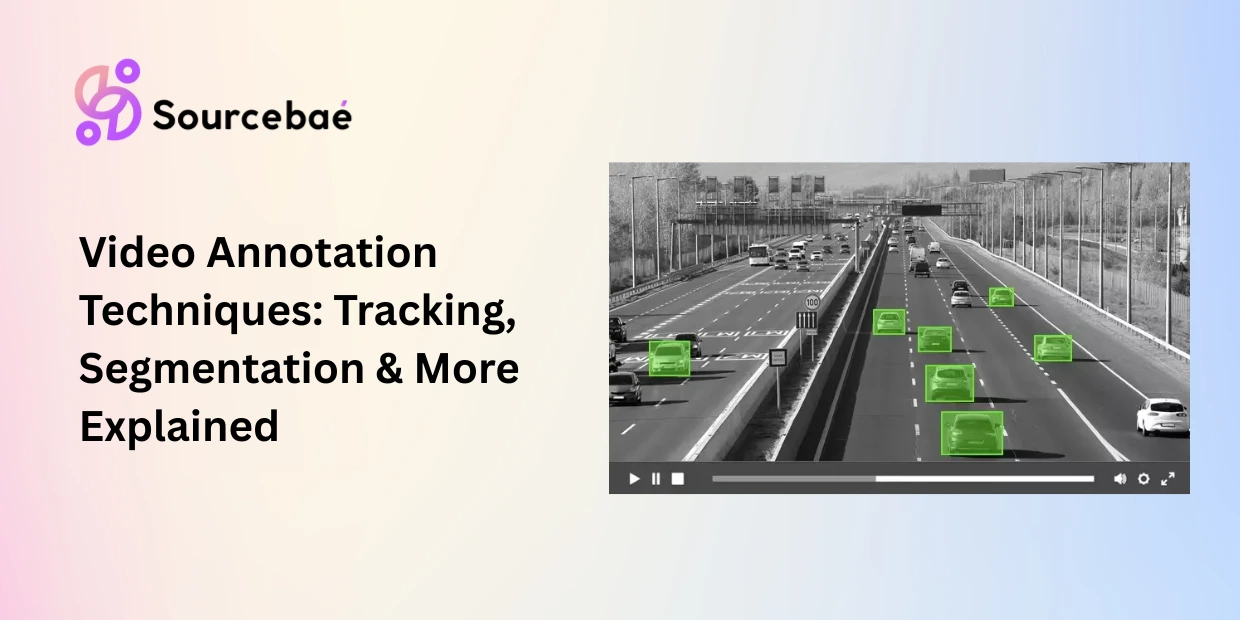

Video annotation is the process of labeling objects, actions, and events across sequences of video frames so that computer vision models can detect, track, and understand motion over time. Unlike static image annotation, video annotation introduces a temporal dimension the model must learn not just what is in a scene, but how it moves, changes, and interacts across hundreds or thousands of consecutive frames.
The scale of video annotation for machine learning is staggering. A single hour of footage at 30 frames per second produces 108,000 individual frames, each potentially requiring spatial labels that must remain temporally consistent across the entire sequence. Autonomous vehicles and mobility applications account for roughly 32.9% of the entire AI annotation market, making it the single largest vertical driving demand for video annotation, according to Encord’s 2026 market analysis.
This complexity makes video annotation fundamentally more challenging and more expensive than image annotation. A bounding box drawn on frame 1 must follow the same object through occlusion, scale changes, lighting shifts, and camera movement across frame 1,000. Maintaining this temporal consistency is what separates video annotation from simply annotating images one at a time.
This guide covers every major video annotation technique, from frame-by-frame labeling through AI-assisted tracking, with dedicated sections on the two highest-demand applications: video annotation autonomous driving and surveillance/security systems.
Frame-by-Frame vs. Keyframe Interpolation: Two Foundational Approaches
Before exploring individual techniques, it is important to understand the two foundational workflows that govern how video annotation is executed at scale.
Frame-by-frame annotation labels every individual frame independently. An annotator draws bounding boxes, polygons, or segmentation masks on frame 1, then moves to frame 2 and repeats the process. This approach produces the highest precision because every frame receives direct human attention, but it is extraordinarily time-consuming. Annotating a 30-second clip at 30 FPS requires labeling 900 frames manually a task that can take hours for complex scenes.
Keyframe interpolation is the productivity solution that modern video labeling tools have made standard. The annotator labels objects at selected keyframes perhaps every 5th, 10th, or 30th frame and the tool automatically generates labels for intermediate frames by interpolating position, size, and shape between keyframes. AI-assisted video labeling tools like Encord, CVAT, and V7 Labs use models like Meta’s SAM2 to power this interpolation, reducing manual effort by 60–80% compared to frame-by-frame labeling.
The trade-off is precision versus speed. Keyframe interpolation works well for smoothly moving objects with predictable trajectories. It struggles with sudden direction changes, rapid occlusion events, and non-rigid deformations (a person bending, a flag waving). Production teams typically use interpolation as the default and switch to frame-by-frame for complex segments where automated tracking fails.
Object Tracking Annotation: Following Identity Across Frames
Object tracking annotation is the process of maintaining a consistent identity for a specific object across an entire video sequence. When a car enters the frame at time 0:01 and exits at time 0:45, object tracking annotation ensures that every frame in between labels that car with the same unique ID even through partial occlusion, lighting changes, and camera movement.
How it works
The annotator identifies each object of interest in the first frame and assigns it a unique identifier (e.g., Vehicle_5, Pedestrian_12). As the video progresses, the annotator or an AI-assisted tracking model follows each object across subsequent frames, updating its position and maintaining its identity. When an object becomes temporarily occluded (hidden behind another object) and reappears, object tracking annotation must correctly re-link it to its original ID rather than assigning a new one.
Quality in object tracking annotation is measured by tracking accuracy metrics such as Multiple Object Tracking Accuracy (MOTA) and ID switches the number of times an object’s identity is incorrectly swapped with another. Fewer ID switches indicate higher-quality tracking annotation.
Use cases
Object tracking annotation powers pedestrian and vehicle tracking in autonomous driving, player and ball tracking in sports analytics, customer movement tracking in retail stores, wildlife migration pattern analysis, and multi-target tracking in surveillance and security systems.
Common pitfalls
ID consistency through occlusion is the core challenge. When a pedestrian walks behind a parked truck and reappears three seconds later, annotators must correctly assign the same ID. Without clear guidelines and careful attention, annotators create “ID switches” that teach the model to treat one continuous object as two separate entities.
Dense scenes with many objects create annotation fatigue. A busy intersection may contain 40+ simultaneously visible objects, each requiring individual tracking. Annotator error rates increase sharply as object count rises. For scenes exceeding 20–30 tracked objects, consider splitting annotation across multiple passes or annotators.
Temporal Segmentation Annotation: Dividing Video into Meaningful Events
Temporal segmentation annotation divides a continuous video stream into discrete time segments, each labeled with a meaningful event, activity, or phase. Instead of labeling spatial objects within frames, temporal segmentation annotation labels time intervals marking when specific events begin and end.
How it works
The annotator watches the video and marks boundary timestamps that separate one event or phase from another. Each resulting segment receives a label from a predefined taxonomy. For a cooking tutorial, segments might be labeled “ingredient preparation,” “mixing,” “baking,” and “plating.” For a surgical video, segments might be “incision,” “dissection,” “suturing,” and “closure.”
Temporal segmentation annotation operates at a fundamentally different granularity than spatial annotation. Rather than asking “where is the object in this frame?” it asks “what is happening during this time period?”
Use cases
Surgical phase recognition (identifying specific procedural steps for training and quality assurance), sports event detection (segmenting goals, fouls, timeouts, and plays), video summarization (identifying key moments in long recordings), manufacturing process monitoring (detecting phase transitions in assembly lines), and content indexing for media platforms (enabling chapter navigation in educational videos).
Common pitfalls
Ambiguous transition boundaries are the primary challenge. When exactly does “mixing” end and “baking” begin? Does preheating the oven count as part of baking or preparation? Annotation guidelines must define transition rules with precise temporal criteria and annotators must be trained on boundary examples before production labeling begins.
Overlapping activities require schema decisions. If a surgeon is simultaneously suturing and cauterizing, does the segment receive both labels, the dominant label, or a combined label? Your taxonomy must account for concurrent events.
Action Recognition Annotation: Labeling What Is Happening
Action recognition annotation labels specific human actions or activities within video segments walking, running, jumping, falling, waving, fighting, handshaking, or any other definable behavior. While temporal segmentation divides a video into phases, action recognition annotation classifies the specific activity occurring within each segment.
How it works
Annotators watch video clips and assign action labels from a predefined taxonomy. Depending on the project, action recognition annotation may operate at different granularities. Clip-level annotation assigns one action label to an entire short clip (3–10 seconds). Frame-level annotation marks the exact frames where a specific action begins and ends. Keypoint-based annotation combines action labels with human pose keypoints to capture both what the person is doing and how their body is positioned.
Use cases
Action recognition annotation powers fall detection systems for elderly care, suspicious behavior detection in security and surveillance, athletic performance analysis in sports, gesture recognition for sign language AI, driver distraction detection in automotive safety systems, and physical therapy exercise tracking in healthcare.
Common pitfalls
Action ambiguity is the primary challenge. Is a person “jogging” or “running”? Is someone “arguing” or “discussing animatedly”? Clear action definitions with video examples of boundary cases are essential for consistent annotation.
Camera angle dependency affects annotation quality. The same action a person falling looks very different from a top-down camera versus a side-angle camera. Annotators must be trained on multi-angle representations of each action class, and datasets should include diverse viewpoints.
Video Annotation for Autonomous Driving: The Highest-Stakes Application
Video annotation autonomous driving represents the single most demanding application of video labeling requiring multiple simultaneous annotation types, safety-critical accuracy thresholds, and massive data volumes. Waymo, for example, has annotated the equivalent of over 100 years of driving footage to train its autonomous systems.
What makes autonomous driving annotation unique
A self-driving perception system must simultaneously detect and track every vehicle, pedestrian, cyclist, traffic sign, and road marking in its field of view across camera feeds, LiDAR point clouds, and radar data. Video annotation autonomous driving projects typically combine multiple techniques in a single pipeline.
Object tracking maintains unique IDs for every dynamic agent in the scene each car, each pedestrian, each cyclist across the full duration of the clip. A single urban intersection scene may require tracking 30–50 objects simultaneously.
Semantic segmentation labels the drivable surface, sidewalks, lane markings, vegetation, and sky at the pixel level, giving the perception system a complete understanding of the road environment.
3D bounding cuboids (from synchronized LiDAR data) provide depth, distance, and volumetric information that camera-only bounding boxes cannot capture. Sensor fusion annotation aligns these 3D labels with 2D camera annotations to create a unified ground truth.
Behavioral attribute annotation adds context beyond spatial labels. A pedestrian’s bounding box might include attributes like “crossing street,” “waiting at curb,” or “looking at phone” information the planning system uses to predict behavior and make safe driving decisions.
Quality thresholds
The accuracy requirements for video annotation autonomous driving are among the strictest in any AI domain. Production systems typically require 99.5%+ annotation accuracy for safety-critical perception models. Even small labeling errors a mislabeled pedestrian, an incorrect lane boundary can propagate through the planning stack and create dangerous driving decisions. Multi-pass review workflows with expert adjudication are standard practice.
The 4D annotation frontier
In 2026, leading autonomous driving teams are moving toward 4D spatio-temporal annotation combining 3D spatial labels with temporal tracking into a unified representation. This enables prediction of object trajectories, anticipation of lane-change behavior, and understanding of complex multi-agent interactions at intersections. 4D annotation is the most advanced form of video annotation for machine learning currently in production.
Video Annotation for Surveillance and Security
Security and surveillance represents the second-largest application of video annotation after autonomous driving. AI-powered surveillance systems use annotated video to detect threats, track individuals, identify anomalous behavior, and automate monitoring across camera networks.
Key annotation tasks
Person detection and tracking — Drawing bounding boxes around every individual in the frame and maintaining identity across the video sequence. This enables people counting, crowd density estimation, and individual movement tracking.
Anomaly detection annotation — Labeling segments of video where unusual or suspicious behavior occurs — loitering, abandoned objects, unauthorized access, aggressive gestures. Annotators mark both the time window and the spatial location of the anomaly.
Event classification — Using action recognition annotation to classify specific events: a person entering a restricted zone, a vehicle stopping in a no-parking area, or a crowd forming unexpectedly. Each event receives a class label, timestamp, and spatial location.
Retailers have achieved significant cost savings by deploying AI video analytics trained on annotated surveillance footage to reduce shoplifting and improve incident response. In public safety, annotated surveillance data powers real-time alert systems that can detect abandoned bags, track suspects across multiple camera feeds, and flag crowd crush risks at large events.
Comparing Video Annotation Techniques
| Technique | What It Labels | Temporal Scope | Speed | Cost Per Minute of Video | Best For |
| Frame-by-frame | Spatial objects per frame | Single frames | Slowest | Highest ($15–$50+) | Maximum precision scenes |
| Keyframe interpolation | Spatial objects via keyframes | Full sequence | Fast | Medium ($5–$15) | Standard tracking workflows |
| Object tracking | Object identity + position | Full sequence | Moderate | Medium–High ($8–$20) | Multi-object detection systems |
| Temporal segmentation | Time-based events/phases | Full sequence | Fast | Low ($2–$8) | Activity phase labeling |
| Action recognition | Activity classes per segment | Clip or segment | Fast | Low–Medium ($3–$10) | Behavior classification |
| AV multi-layer | Objects + lanes + semantics + 3D | Full sequence | Slowest | Highest ($30–$100+) | Autonomous driving perception |
Note: Costs are approximate per-minute ranges for outsourced annotation in 2026. Actual costs vary by scene complexity, object density, and vendor.
AI-Assisted Video Annotation in 2026
Modern video annotation pipelines are increasingly hybrid. AI-assisted tools generate initial annotations that human reviewers verify and correct transforming the annotator’s role from creator to quality reviewer.
SAM2 (Segment Anything Model 2) from Meta can propagate segmentation masks across video frames from a single click on one keyframe. This has reduced segmentation annotation time by up to 80% for common object classes.
AI-powered interpolation in enterprise video labeling tools predicts object positions between keyframes using motion models, handling linear movement, acceleration, and basic occlusion patterns automatically. Annotators focus on correcting edge cases rather than labeling every frame.
Active learning identifies the most informative frames in a video frames where the model is least confident and routes only those frames to human annotators. This prevents teams from spending annotation budget on thousands of redundant, similar frames.
However, AI-assisted tools still fail systematically on novel object types not in their training data, dense scenes with heavy occlusion, rapid non-linear motion, and unusual camera angles or lighting. Human oversight remains essential for production-quality video annotation for machine learning, especially in safety-critical applications like autonomous driving and medical video analysis.
→ Related: [The Complete Guide to Data Annotation Methodologies in 2026] → Related: [The Complete Taxonomy of Data Annotation Types: A Visual Guide] → Related: [Image Annotation Methods Explained: Bounding Boxes, Segmentation, Keypoints, and Polygons] → Related: [3D Point Cloud and LiDAR Annotation: Methods for Autonomous Driving and Robotics] → Related: [Annotation for Autonomous Agents and Robotics: Reward Shaping, Trajectory Labeling, and Environment Annotation]
Frequently Asked Questions
What is video annotation?
Video annotation is the process of labeling objects, actions, and events across sequences of video frames so that computer vision models can detect, track, and understand motion over time. Unlike image annotation, video annotation requires temporal consistency every labeled object must maintain its identity and spatial accuracy across the full duration of the clip. It is the foundation of autonomous driving perception, surveillance analytics, sports AI, and medical video analysis.
How is video annotation for machine learning different from image annotation?
Video annotation for machine learning adds a temporal dimension that image annotation does not have. Image annotation labels static snapshots. Video annotation must maintain object identity across frames, handle occlusion and re-appearance, track motion trajectories, and label time-based events. A single hour of video at 30 FPS contains 108,000 frames each requiring labels that are consistent with every other frame. This temporal consistency requirement makes video annotation 5–10x more time-consuming and expensive than equivalent image annotation.
What is object tracking annotation?
Object tracking annotation maintains a unique identity for each object across an entire video sequence. When a pedestrian enters the frame, is temporarily hidden behind a vehicle, and reappears, object tracking annotation ensures the same ID is assigned throughout. Quality is measured by tracking metrics like MOTA (Multiple Object Tracking Accuracy) and ID switch count. It is essential for autonomous driving, surveillance, sports analytics, and retail behavior analysis.
What is temporal segmentation annotation?
Temporal segmentation annotation divides a continuous video into discrete time segments, each labeled with an event, activity, or phase. Instead of labeling spatial objects within frames, it labels when events begin and end such as surgical phases (“incision,” “suturing,” “closure”) or sports events (“goal,” “foul,” “timeout”). It is the foundation of video summarization, process monitoring, and content indexing systems.
What is action recognition annotation?
Action recognition annotation classifies specific human activities within video segments walking, running, falling, waving, or any other definable behavior. It powers fall detection for elderly care, suspicious behavior detection in security, athletic performance analysis, gesture recognition for sign language AI, and driver distraction detection. The biggest challenge is action ambiguity clear definitions with video examples of boundary cases are essential for consistent labeling.
How does video annotation for autonomous driving work?
Video annotation autonomous driving combines multiple annotation techniques simultaneously: object tracking (unique IDs for every vehicle, pedestrian, and cyclist), semantic segmentation (drivable surface, lanes, sidewalks), 3D bounding cuboids (from LiDAR data for depth perception), and behavioral attributes (pedestrian intent, vehicle turning signals). Autonomous driving requires 99.5%+ annotation accuracy for safety-critical models. Waymo has annotated the equivalent of over 100 years of driving footage. The frontier in 2026 is 4D spatio-temporal annotation that combines 3D spatial labels with temporal trajectory tracking.
What video labeling tools are best in 2026?
Leading video labeling tools for video annotation in 2026 include Encord (best for temporal tracking and AI-assisted keyframe interpolation with SAM2), CVAT (best open-source option with persistent object ID tracking), V7 Labs (strong for medical video and AI agent workflows), Labelbox (enterprise-grade with multi-modal support), Scale AI (best for high-volume managed annotation services), and SuperAnnotate (fast AI-assisted workflows). Key features to evaluate: keyframe interpolation quality, AI-assisted tracking accuracy, temporal consistency validation, and integration with your MLOps pipeline. For autonomous driving, prioritize tools that support multi-sensor fusion annotation across camera, LiDAR, and radar simultaneously.