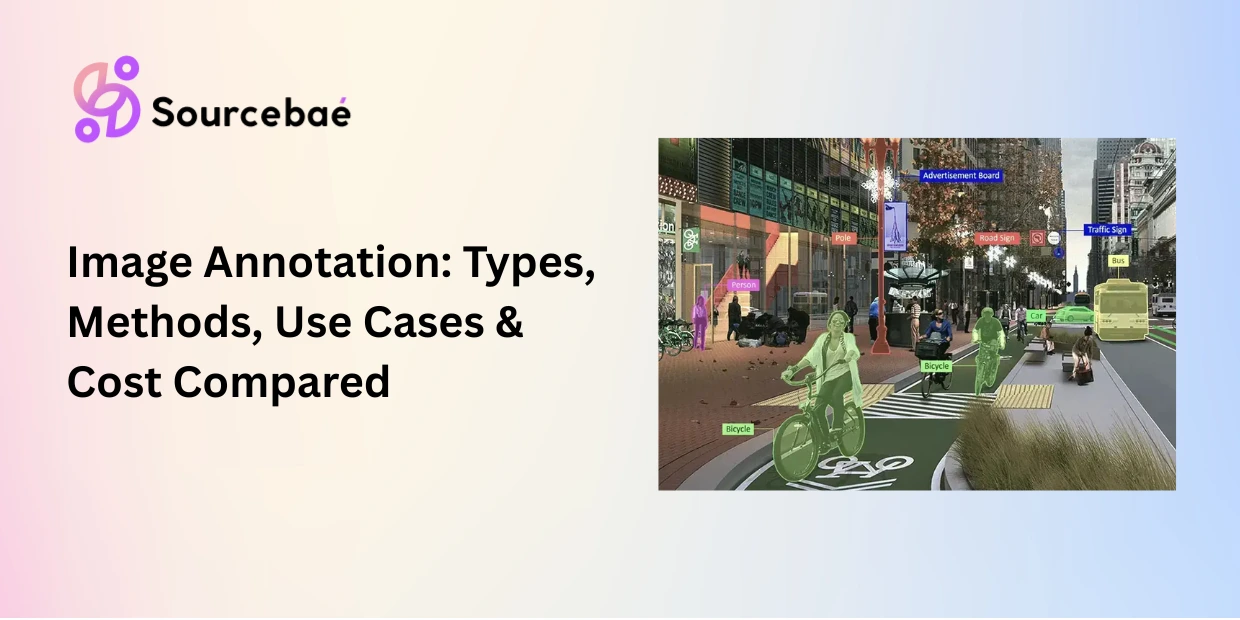

Image annotation is the process of adding structured labels bounding boxes, polygons, segmentation masks, or keypoints to visual data so that computer vision models can detect, classify, locate, and understand objects within images. It is the most widely recognized form of data annotation and the foundation of AI systems from autonomous vehicles to medical diagnostics.
Choosing the right image annotation types for your project directly impacts model accuracy, annotation cost, and time to production. A retail product detection model may need only simple bounding boxes. A surgical AI system may require pixel-precise segmentation of every tissue boundary. A fitness application tracking body movement requires keypoint annotation of human joints. Each method serves a different purpose, and selecting the wrong one creates a ceiling on model performance that no amount of training can overcome.
Image labeling for computer vision now operates within a market valued at $8.26 billion in 2026 (Research Nester), with image and video annotation collectively accounting for the second-largest segment after text. This guide explains every major image annotation method, when to use each, and how they compare on accuracy, speed, and cost. Whether you are annotating your first dataset or redesigning your labeling pipeline, this is your definitive reference.
Bounding Box Annotation: Fast, Scalable Object Detection
Bounding box annotation is the process of drawing a rectangle around an object of interest in an image and assigning it a class label. Each box is defined by its coordinates typically the top-left and bottom-right corners encoding the object’s position and approximate size within the frame.
Bounding box annotation is the most widely used image annotation method because it strikes the best balance between speed and usefulness for detection tasks. An experienced annotator can draw and label hundreds of bounding boxes per hour, making it the most cost-effective spatial annotation technique.
How it works
The annotator identifies each object that matches the annotation schema (e.g., every vehicle, pedestrian, and traffic sign in a driving scene), draws a tight rectangle around it, and assigns a class label. Good bounding boxes are drawn as tightly as possible around the object’s visible boundary, minimizing background inclusion.
Some projects use oriented (rotated) bounding boxes for objects that sit at angles such as ships in aerial imagery or text in documents. Others use 3D cuboids to capture depth in addition to width and height, commonly used in LiDAR-camera fusion for autonomous driving.
When to use bounding box annotation
Bounding box annotation is ideal when you need to detect and locate objects but do not need pixel-precise boundaries. Common use cases include vehicle and pedestrian detection in autonomous driving, product detection in retail shelf analytics, defect localization in manufacturing quality inspection, face detection in security systems, and object counting in aerial or satellite imagery.
Limitations
Bounding boxes include background pixels the rectangle captures the object and everything around it. For irregularly shaped objects (curved medical instruments, winding roads, organic produce), this excess background can confuse models. Bounding boxes also struggle in densely packed scenes where objects overlap heavily. When pixel precision matters, you need polygon annotation or segmentation.
Polygon Annotation: Precise Outlines for Irregular Objects
Polygon annotation is the process of tracing the exact shape of an object by placing connected points along its boundary. Unlike bounding boxes, which force all objects into rectangles, polygon annotation follows the actual contour of each item capturing irregular shapes, curves, and complex silhouettes with significantly higher precision.
How it works
The annotator places sequential points along the object’s edge. The tool connects these points with straight line segments, forming a closed polygon. More points mean greater contour accuracy but also more annotation time per object. A simple rectangular object might need 4–6 points. A complex biological specimen might require 30–50 or more.
Recruit the top 1% of Domain experts today!
Access exceptional professionals worldwide to drive your success.
When to use polygon annotation
Polygon annotation is best suited for objects with non-rectangular shapes where bounding box excess background would degrade model performance. Common use cases include building and road outlines in geospatial imagery, organ and lesion boundaries in medical imaging, product outlines in e-commerce visual search, irregularly shaped manufacturing defects, and agricultural crop regions in drone imagery.
Limitations
Polygon annotation is 2–5x slower than bounding box annotation per object, which translates directly to higher labeling cost. Annotation quality also depends on point density if one annotator uses 10 points on a wheel and another uses 50, the model receives inconsistent boundary data. Clear guidelines specifying minimum point density per object class are essential.
Semantic Segmentation Annotation: Pixel-Level Scene Understanding
Semantic segmentation annotation classifies every single pixel in an image into a predefined category. Unlike bounding boxes or polygons that label individual objects, semantic segmentation annotation creates a complete, pixel-level map of the entire scene labeling every pixel as “road,” “sidewalk,” “vehicle,” “sky,” “vegetation,” or any other class in your taxonomy.
How it works
The annotator (or an AI-assisted tool) assigns a class label to every pixel. The output is a color-coded mask image where each color represents a specific class. Modern tools use superpixel grouping, brush-based painting, and AI-assisted models like SAM (Segment Anything Model) to accelerate the process, but full semantic segmentation annotation remains one of the most time-intensive labeling methods.
When to use semantic segmentation
Semantic segmentation annotation excels when the model needs to understand the complete structure of a scene rather than just individual objects. Key use cases include drivable area detection for autonomous vehicles (labeling every pixel of the road surface), land-use classification in satellite imagery, tissue classification in pathology slides, indoor scene understanding for robotics navigation, and terrain mapping for agricultural or environmental AI.
Limitations
Semantic segmentation does not distinguish between individual instances of the same class. If three cars appear in a scene, all car pixels receive the same “car” label the model cannot tell them apart. When you need to count objects or track them individually, you need instance segmentation.
Instance Segmentation vs Semantic Segmentation: When Individual Objects Matter
The distinction between instance segmentation vs semantic segmentation is one of the most important decisions in image annotation workflow design. Both operate at the pixel level, but they answer fundamentally different questions.
Semantic segmentation answers: “What class does this pixel belong to?” Every car pixel is labeled “car,” but the three cars in the scene are indistinguishable from each other.
Instance segmentation answers: “What class does this pixel belong to, and which specific object is it part of?” Each car is identified as a separate instance car #1, car #2, car #3 even when they overlap or touch.
When the difference matters
The choice between instance segmentation vs semantic segmentation depends on whether your model needs to count, track, or reason about individual objects.
Choose semantic segmentation when you care about the overall structure of a scene drivable surface detection, land-cover classification, or background/foreground separation. The model needs to know what is where, but not how many individual instances exist.
Choose instance segmentation when you need to count, measure, or track individual objects counting tumors in a medical scan, tracking individual pedestrians in a surveillance feed, measuring the size of specific defects in manufacturing inspection, or distinguishing overlapping products on a retail shelf.
Instance segmentation is more expensive and time-consuming to annotate because each object requires a separate, uniquely identified mask. For large datasets, the cost difference between semantic and instance segmentation can be 2–3x. Start with semantic segmentation when instance-level distinction is not required by your model’s task you can always upgrade later if evaluation metrics reveal the need.
Panoptic Segmentation Annotation: The Complete Scene Label
Panoptic segmentation annotation combines semantic segmentation and instance segmentation into a single, unified output. It labels every pixel in the image with both a class and, where applicable, an instance identity handling both “stuff” (uncountable regions like sky, road, and grass) and “things” (countable objects like cars, people, and animals) in one pass.
How it works
Panoptic segmentation annotation assigns every pixel a class label (semantic component). For countable object classes, each pixel also receives an instance ID (instance component). The output is a complete scene description: you know every class present, where each class appears, and how many individual instances of each countable class exist.
When to use panoptic segmentation annotation
Panoptic segmentation annotation is the gold standard for full scene understanding. It is essential in autonomous driving (where the model needs to know both the drivable surface and every individual vehicle, pedestrian, and cyclist), in robotics (where the agent must navigate around specific objects while understanding the broader environment), and in augmented reality (where scene editing requires both background classification and individual object manipulation).
Limitations
Panoptic segmentation annotation is the most time-intensive and expensive image annotation method. It requires annotators to produce a complete semantic mask and identify every individual instance combining the workload of both semantic and instance segmentation. Reserve it for applications where full scene understanding with instance-level granularity is a non-negotiable requirement.
Keypoint Annotation: Tracking Structure, Pose, and Landmarks
Keypoint annotation (also called landmark annotation) marks specific points of interest on an object joints, corners, anatomical landmarks, or structural features and connects them into a skeleton or graph. Instead of describing an object’s shape or boundary, keypoint annotation captures its internal structure and spatial configuration.
How it works
The annotator defines a set of keypoints for each object class (e.g., 17 body joints for human pose estimation, or 68 facial landmarks for face analysis). For each object in the image, the annotator places each keypoint at the corresponding location. The tool connects keypoints into a predefined skeleton that represents the object’s structural configuration.
When to use keypoint annotation
Keypoint annotation is the method of choice for tasks where structure, pose, or alignment matter more than boundary shape. Primary use cases include human pose estimation for fitness, sports analytics, and motion capture systems, facial landmark detection for face recognition, emotion analysis, and AR filters, hand and finger tracking for gesture recognition and sign language AI, animal pose estimation for wildlife research and livestock monitoring, and anatomical landmark identification in medical imaging.
Limitations
Keypoint annotation captures structure but not shape or area. A keypoint skeleton tells the model where joints are, but not where skin, clothing, or body boundaries exist. For applications that need both structure and shape such as full-body AR avatars you may need to combine keypoint annotation with segmentation masks.
Comparing Image Annotation Types: Method Selection Table
The right image annotation types depend on your model’s task, your accuracy requirements, and your annotation budget. This comparison table summarizes the trade-offs across all six methods.
| Method | What It Labels | Precision Level | Annotation Speed | Cost Per Image | Best For |
| Bounding box | Object location + class | Low–Medium (includes background) | Fastest (100+ objects/hour) | Lowest ($0.05–$0.50) | Object detection, counting, localization |
| Polygon | Object boundary + class | Medium–High (follows contour) | Moderate (30–60 objects/hour) | Medium ($0.50–$2.00) | Irregular shapes, geospatial, medical boundaries |
| Semantic segmentation | Every pixel → class | High (pixel-level) | Slow (2–10 images/hour) | High ($2–$8) | Scene understanding, drivable area, land-cover |
| Instance segmentation | Every pixel → class + instance ID | Highest (pixel + instance) | Slowest (1–5 images/hour) | Highest ($5–$15) | Counting, tracking, overlapping objects |
| Panoptic segmentation | Every pixel → class + instance (unified) | Highest (complete scene) | Slowest | Highest ($8–$20) | Full scene understanding (AV, robotics, AR) |
| Keypoint | Structural points + skeleton | High (structural) | Fast–Moderate (50–100 objects/hour) | Low–Medium ($0.10–$1.00) | Pose estimation, facial landmarks, gesture |
Note: Cost estimates are approximate per-image ranges for outsourced annotation in 2026. Actual costs vary by object density, class complexity, and vendor.
How to Choose the Right Image Annotation Method
Selecting the correct method for image labeling for computer vision is a function of three variables: the task your model must perform, the precision your application demands, and the budget and timeline constraints you operate within.
Step 1: Identify the model’s task. If the model must detect and locate objects, start with bounding box annotation. If it must understand exact object shapes, use polygon annotation or segmentation. It must understand pose or structure, use keypoint annotation. It must understand the full scene with both background and individual objects, use panoptic segmentation annotation.
Step 2: Calibrate to precision requirements. A retail shelf-scanning model may perform well with bounding boxes. A surgical AI system that must outline tumor margins requires instance segmentation at the pixel level. Match annotation precision to the consequence of errors in your application higher stakes demand higher precision methods.
Step 3: Balance against budget and timeline. More precise image annotation types cost more and take longer. If your project is in early prototyping, start with bounding boxes to validate feasibility quickly and inexpensively. Upgrade to segmentation or keypoints only when evaluation metrics prove that the current annotation method is the performance bottleneck.
Step 4: Run a pilot. Annotate 500–1,000 images using two candidate methods. Train your model on each, compare performance metrics, and let the data tell you which method your application actually requires. This pilot-driven approach prevents both over-investing in unnecessary precision and under-investing in annotation quality.
When in doubt, start simple and increase complexity only where evidence shows it is needed. The best image labeling for computer vision strategy is one that matches annotation investment to model performance impact not one that defaults to the most expensive method.
AI-Assisted Image Annotation in 2026
Image annotation workflows in 2026 are increasingly hybrid: AI models generate initial labels, and human annotators verify and correct them. This model-in-the-loop approach has transformed productivity.
Meta’s Segment Anything Model (SAM) and its successors can generate segmentation masks from a single click or text prompt, automating up to 97% of mask creation for common object classes. Human annotators then focus on corrections, edge cases, and quality validation the tasks where human judgment adds the most value.
Active learning algorithms further optimize the pipeline by identifying which images will provide the greatest training signal when annotated, ensuring annotation budget is spent on the most informative data rather than redundant samples.
For teams scaling image annotation operations, combining AI-assisted pre-labeling with human-in-the-loop review is now the default workflow reducing per-image annotation time by 40–60% while maintaining or improving quality metrics.
→ Related: [The Complete Taxonomy of Data Annotation Types: A Visual Guide] → Related: [Text Annotation for NLP: NER, Sentiment, Intent, Relation Extraction, and More] → Related: [Video Annotation Techniques: Object Tracking, Temporal Segmentation, and Activity Recognition] → Related: [3D Point Cloud and LiDAR Annotation: Methods for Autonomous Driving and Robotics] → Related: [Geospatial and Satellite Imagery Annotation: Methods for Remote Sensing AI] → Related: [The Complete Guide to Data Annotation Methodologies in 2026]
Frequently Asked Questions
What are the main image annotation types?
The primary image annotation types are bounding box annotation (rectangles around objects), polygon annotation (precise outlines for irregular shapes), semantic segmentation annotation (classifying every pixel by class), instance segmentation (pixel-level labeling with individual object identity), panoptic segmentation annotation (combining semantic and instance segmentation), and keypoint annotation (marking structural points like joints and landmarks). Each method serves different computer vision tasks and carries different cost-accuracy trade-offs.
What is the difference between instance segmentation vs semantic segmentation?
Semantic segmentation labels every pixel in an image with a class (road, car, sky) but does not distinguish between individual objects of the same class. Instance segmentation adds a unique identity to each object so three cars in a scene are recognized as car #1, car #2, and car #3. The distinction between instance segmentation vs semantic segmentation determines whether your model can count, track, or measure individual objects. Choose semantic when you need scene structure. Choose instance when you need individual object reasoning.
When should I use bounding box annotation vs polygon annotation?
Use bounding box annotation when your objects are roughly rectangular and you need fast, cost-effective labeling object detection, vehicle counting, product localization. Use polygon annotation when your objects have irregular shapes and including background pixels would degrade model performance medical organ boundaries, geospatial building outlines, industrial defect contouring. Bounding boxes are 2–5x faster and cheaper; polygons provide significantly higher boundary precision.
What is keypoint annotation used for?
Keypoint annotation marks specific structural points on objects joints for human pose estimation, facial landmarks for face analysis, finger positions for gesture recognition, or anatomical reference points for medical analysis. It captures an object’s internal structure and spatial configuration rather than its boundary shape. Keypoint annotation is essential for any application that needs to understand how an object is positioned, oriented, or articulated.
What is panoptic segmentation annotation?
Panoptic segmentation annotation combines semantic segmentation and instance segmentation into one unified output. It labels every pixel with a class and, for countable objects, also assigns an individual instance ID. This means the model understands both the background scene structure (road, sky, grass) and every individual object within it (car #1, pedestrian #3). It is the most complete and most expensive form of image annotation, used primarily in autonomous driving, robotics, and augmented reality.
How much does image annotation cost?
Costs vary dramatically by method. Bounding box annotation costs approximately $0.05–$0.50 per image for outsourced work. Polygon annotation ranges from $0.50–$2.00. Semantic segmentation annotation runs $2–$8 per image. Instance and panoptic segmentation annotation can cost $5–$20+ per image, depending on object density and class complexity. Keypoint annotation typically costs $0.10–$1.00 per object. AI-assisted pre-labeling can reduce these costs by 40–60% by automating initial label generation and focusing human effort on verification and correction.
What tools are used for image labeling for computer vision?
Leading platforms for image labeling for computer vision in 2026 include Labelbox, Encord, Scale AI, V7 Labs, SuperAnnotate, and CVAT (open-source). These tools support bounding boxes, polygons, segmentation masks, keypoints, and video tracking. AI-assisted features like SAM-based auto-segmentation and active learning pipelines are now standard in enterprise platforms. Choose tools based on your data format, required annotation types, team size, and MLOps integration needs.